We have compiled a list of manufacturers, distributors, product information, reference prices, and rankings for Visualization Tools.
ipros is IPROS GMS IPROS One of the largest technical database sites in Japan that collects information on.

Visualization Tools Product List and Ranking from 13 Manufacturers, Suppliers and Companies | IPROS GMS

Last Updated: Aggregation Period:Apr 08, 2026~May 05, 2026
This ranking is based on the number of page views on our site.

Visualization Tools Manufacturer, Suppliers and Company Rankings

Last Updated: Aggregation Period:Apr 08, 2026~May 05, 2026
This ranking is based on the number of page views on our site.

  1. 進和 戦略営業推進室 Aichi//Industrial Machinery
  2. システム科学 Tokyo//IT/Telecommunications
  3. IDAJ Kanagawa//software
  4. 4 Nabari Holdings Co.,Ltd. Aichi//Industrial Electrical Equipment
  5. 5 ハートコア Tokyo//software

Visualization Tools Product ranking

Last Updated: Aggregation Period:Apr 08, 2026~May 05, 2026
This ranking is based on the number of page views on our site.

  1. Inventory visualization tool "Stock Counter" 進和 戦略営業推進室
  2. Business Process Innovation Tool 'HitWeb' システム科学
  3. Flotherm・Flotherm PCB Analysis Result Visualization Tool IDAJ
  4. 4 Easily create graphs from data with simple mouse operations! Detailed video available! Nabari Holdings Co.,Ltd.
  5. 5 Business visualization tool 'CONTROLIO' ハートコア

Visualization Tools Product List

1~16 item / All 16 items

Displayed results

Big Data Visualization Tool 'BIGDAT@Analysis'

Achieving new insights and anomaly detection through data visualization from "zero-order analysis" of manufacturing big data.

Utilizing IoT, opportunities for improving productivity and creating new value are expanding by collecting and utilizing various data from production equipment and products. Many companies are collecting and accumulating data, but they face challenges such as uncertainty about its potential uses, lack of knowledge on how to utilize it, shortage of personnel for utilization, and absence of know-how. The data obtained simultaneously from various sensor devices becomes vast and multivariate so-called big data, which is difficult to analyze with traditional analytical tools, necessitating new analytical techniques. BIGDAT@Analysis is an application that allows for the visualization and analysis of big data without requiring specialized knowledge in statistical analysis or multivariate analysis, enabling easy operation. 【Features】 ■ All existing data can be analyzed and visualized immediately on a map with simple operations. ■ The mutual similarity and relevance of a series of data with multiple data items, attributes, and dimensions are expressed as mutual distances on the map. ■ Intuitive operations and visualization help identify analytical axes of the data and formulate hypotheses. ■ Contributes to discovering different analyses of data and identifying data items that affect failures and anomalies.

Added to bookmarks

Bookmarks list

Bookmark has been removed

Bookmarks list

You can't add any more bookmarks

By registering as a member, you can increase the number of bookmarks you can save and organize them with labels.

Free membership registration

Flotherm・Flotherm PCB Analysis Result Visualization Tool

Simcenter Flotherm Viewer: License-free! Available for customers who do not have a Flotherm contract.

● Is it possible that the outsourcing partner for thermal analysis is using Simcenter Flotherm or Simcenter Flotherm PCB? By using Simcenter Flotherm Viewer, you can check the analysis results without a license for Simcenter Flotherm or Simcenter Flotherm PCB, and you can also freely change the viewpoint to view it in three dimensions. ● Would you like the thermal analysis results to be viewed not just as screenshots, but from various angles? Please introduce Simcenter Flotherm Viewer to your customers as a 3D viewer for analysis results.

  • Company:IDAJ
  • Price:Other
  • Other analyses
  • Thermo-fluid analysis
  • Visualization Tools

Added to bookmarks

Bookmarks list

Bookmark has been removed

Bookmarks list

You can't add any more bookmarks

By registering as a member, you can increase the number of bookmarks you can save and organize them with labels.

Free membership registration

Recommended Operating Model for the Data Visualization Tool "MicroAVS"

Adopting an easy-to-understand GUI! A recommended model of a tool that beginners in visualization can easily master.

"MicroAVS" is a data visualization tool that allows users to utilize advanced visualization features and 3D graphics capabilities with simple operations. It enables impactful visual expressions in presentations across various fields such as experiments and measurements, fluid dynamics, structures, environment, civil engineering, and healthcare. Our company offers the recommended operating model for "MicroAVS," the 'Be-Clia Type-S12IS80,' so please feel free to use it. 【Features】 ■ Cybernet Systems Corporation Collaboration Model <MicroAVS> ■ Visualization Icons ■ Scripts ■ Impactful Presentations *For more details, please refer to the related links or feel free to contact us.

  • 2022-04-22_11h43_42.png
  • 2022-04-22_11h43_45.png
  • 2022-04-22_11h43_51.png
  • 2022-04-22_11h43_56.png
  • 2022-04-22_11h44_01.png
  • Industrial PCs
  • Other PCs and OA equipment
  • Visualization Tools

Added to bookmarks

Bookmarks list

Bookmark has been removed

Bookmarks list

You can't add any more bookmarks

By registering as a member, you can increase the number of bookmarks you can save and organize them with labels.

Free membership registration

Business Process Innovation Tool 'HitWeb'

Achieve productivity improvement through business visualization with the business process innovation tool HitWeb!

The business process innovation tool HitWeb significantly contributes to improving corporate productivity by visualizing each individual's tasks using S charts. Hit is our proprietary improvement technology (tool) that obtained a patent in 2010 as a "chart creation system and business process visualization method." It has been highly regarded by American management scholar P.F. Drucker and is currently implemented in over 110 companies, achieving great results. The latest and definitive version of HitWeb is currently in operation with great acclaim. - HitWeb (formerly known as HIT.s Cloud) introduction video: https://youtu.be/yXQnLG8i_vg - "What is the Hit Method?": https://www.ss-hit.co.jp/hits/about.html *For more details, please download the PDF or feel free to contact us.

  • ERP Package
  • Other information systems
  • Visualization Tools

Added to bookmarks

Bookmarks list

Bookmark has been removed

Bookmarks list

You can't add any more bookmarks

By registering as a member, you can increase the number of bookmarks you can save and organize them with labels.

Free membership registration

[Data] Waiting for cargo and handling at collection and delivery points, and management of chartered vehicles through DX.

Explaining the impact of the 2024 logistics issue! Introduction of a visualization tool for operational tasks.

This document explains measures for the 2024 logistics issue, focusing on waiting times and cargo handling at delivery locations, as well as vehicle management through digital transformation (DX). It introduces the logistics 2024 issue and its impact on the logistics industry, the realities of waiting and cargo handling times, and challenges in understanding operational realities. Additionally, it provides detailed explanations of the activities and achievements of truck G-men, as well as the visualization of waiting times, cargo handling times, and operational tasks through DX. 【Contents】 ■ Logistics 2024 issue and its impact on the logistics industry ■ Realities of waiting and cargo handling times ■ Challenges in understanding operational realities ■ Achievements of truck G-men ■ Visualization of waiting times, cargo handling times, and operational tasks through DX ■ Introduction of the operational visualization tool "Doratan" and examples of its use in line with policy packages *For more details, please download the PDF or feel free to contact us.

  • Process Control System
  • Visualization Tools

Added to bookmarks

Bookmarks list

Bookmark has been removed

Bookmarks list

You can't add any more bookmarks

By registering as a member, you can increase the number of bookmarks you can save and organize them with labels.

Free membership registration

Data visualization tool "9Chapter"

You can quickly create visualization applications without a complex learning process!

The data visualization tool "9Chapter" is a digital experience application for collecting, analyzing, and visualizing business data. Companies can visualize characteristics and trends from vast amounts of data, improving the decision-making process. It also offers lightweight data analysis and visualization features similar to Tableau. With cloud-based analysis, you can display findings on a dashboard and share discoveries from the data with anyone. 【Features】 ■ Editing and creation possible from the web ■ Access to interactive dashboards from anywhere ■ Ability to create new customized workbooks from data with comprehensive editing features ■ Provides a simple and user-friendly interface along with quick drag-and-drop functionality *For more details, please refer to the related links or feel free to contact us.

  • Document and Data Management
  • Visualization
  • Visualization Tools

Added to bookmarks

Bookmarks list

Bookmark has been removed

Bookmarks list

You can't add any more bookmarks

By registering as a member, you can increase the number of bookmarks you can save and organize them with labels.

Free membership registration

Labor visualization tool "MITERAS Work Visualization"

"MITERAS Work Visualization" that makes the work conditions and tasks of each staff member visible.

"MITERAS Work Visualization" is a work visualization tool that makes actual working conditions and tasks visible. With two functions: "Understanding the Discrepancy in Working Hours" and "Visualizing Work Reality," it achieves the "visualization" of labor. It addresses customer concerns such as long working hours, discrepancies between self-reported and actual hours, and the normalization of unpaid overtime. 【Features】 ■ Function for Understanding Discrepancy in Working Hours - Enables objective understanding of working hours - Can detect unpaid overtime and hidden work on holidays ■ Visualization of Work Reality - Automatically collects PC usage data, allowing insight into staff working conditions - Enables understanding of the tasks of remote workers, such as those working from home *For more details, please download the PDF or feel free to contact us.

  • Personnel and Labor
  • Internal Control and Operational Management
  • Other operation management software
  • Visualization Tools

Added to bookmarks

Bookmarks list

Bookmark has been removed

Bookmarks list

You can't add any more bookmarks

By registering as a member, you can increase the number of bookmarks you can save and organize them with labels.

Free membership registration

Business visualization tool 'CONTROLIO'

The sensor captures all PC operations! Introducing a tool for business visualization and employee monitoring.

"CONTROLIO" is a tool that captures and records all tasks performed by your staff on PCs at a unit operation level, allowing for appropriate analysis and detailed visualization of business activities. It enables the creation of various reports that make it easier to identify issues from the vast amount of event data related to business processes. It is possible to quantify and display the productivity of each employee by organization or individually, clarifying organizational bottlenecks and individual skill issues. [Features] ■ Sensors capture all PC operations ■ Low PC load ■ Multi-architecture support ■ No complex coding required ■ Diverse analytical reports that make it easy to understand issues *For more details, please refer to the PDF materials or feel free to contact us.

  • Other services
  • Visualization Tools

Added to bookmarks

Bookmarks list

Bookmark has been removed

Bookmarks list

You can't add any more bookmarks

By registering as a member, you can increase the number of bookmarks you can save and organize them with labels.

Free membership registration

Inventory visualization tool "Stock Counter"

Real-time inventory management of parts and materials can be checked from a PC!

Stock Counter is a DX tool that eliminates the hassle of inventory management. By placing parts and materials on the counter unit, you can count quantities and weights, and check inventory levels in real-time from a management PC. It accommodates various forms of inventory management, from counting parts inventory by quantity to counting materials inventory by weight. It helps prevent human errors associated with manual management, leading to improved accuracy in inventory management. By digitizing inventory trends, analysis becomes possible, allowing for demand forecasting and sales strategy development. Since it is a one-time purchase, there are no ongoing costs.

  • Process Control System
  • Visualization Tools

Added to bookmarks

Bookmarks list

Bookmark has been removed

Bookmarks list

You can't add any more bookmarks

By registering as a member, you can increase the number of bookmarks you can save and organize them with labels.

Free membership registration

3D data and 3D model visualization tool 'HoloLens2' for blueprints.

*Video now available! Achieved with Microsoft HoloLens 2 × GyroEye Holo! Remote app allows for remote verification and instructions!*

The 3D data and 3D model visualization tool 'Microsoft HoloLens2 × GyroEye Holo' can fulfill various on-site needs such as: - Wanting to embody 3D data on-site while leaving records of construction... - Wanting to see blueprints at the actual location hands-free... (support for marking and inserting) - Wanting to check for interferences before construction... (progress confirmation, equipment interference) We provide total support from 3D measurement services to 3D model visualization. If you send us the actual site blueprints, we will provide you with 'HoloLens2' equipped with '3D data' and '3D models' of the site, so please feel free to contact us! *We are currently posting videos showing usage images in actual work sites! Please take a look! 【Contents】 ■ What is Microsoft HoloLens? ■ What is GyroEye Holo? ■ How to view 3D models with HoloLens2 ■ Achievements with Microsoft HoloLens2 × GyroEye Holo - Projecting 3D models on-site - Maintenance management with 3D models *For more details, please refer to the PDF materials or feel free to contact us.

  • Other network tools
  • Software (middle, driver, security, etc.)
  • Embedded system design service
  • Visualization Tools

Added to bookmarks

Bookmarks list

Bookmark has been removed

Bookmarks list

You can't add any more bookmarks

By registering as a member, you can increase the number of bookmarks you can save and organize them with labels.

Free membership registration

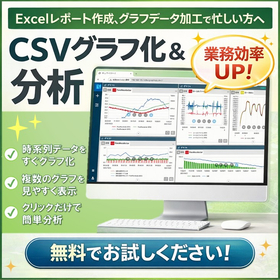
Easily create graphs from data with simple mouse operations! Detailed video available!

Suitable for predictive maintenance and anomaly detection. For those busy with report creation and graph data processing in Excel. Easily analyze CSV data collected through sensing!

Isn't it difficult to utilize data...? With POI it GRAPH, a tool for visualizing and analyzing diverse CSV data, you can easily graph data with simple mouse operations. It is a data visualization and analysis tool designed for use in the field. You can aggregate and visualize multiple CSV data files in a single application, significantly reducing the time spent on report creation and graph editing in Excel, allowing you to focus on "analysis" and "improvement." It supports real-time monitoring and can provide alert notifications tailored to your needs, such as screen displays, sounds, emails, and file outputs when abnormal values are detected. 【Features】 ■ Input CSV data obtained from equipment, loggers, and measuring instruments for visualization ■ Usable without a network or cloud ■ Data registration is easy—just drop the file ■ Equipped with data analysis functions commonly used in manufacturing sites ■ Flexible screen layout with options to arrange and overlay *We also offer a free trial, so please feel free to reach out!

  • Data Logger
  • Visualization Tools

Added to bookmarks

Bookmarks list

Bookmark has been removed

Bookmarks list

You can't add any more bookmarks

By registering as a member, you can increase the number of bookmarks you can save and organize them with labels.

Free membership registration

What is BPMN?

Understanding business processes! We propose appropriate solutions based on the customer's business improvement objectives and goals!

"BPRescue" is a consulting service for improving business efficiency that was developed from years of outsourcing experience to solve the challenges of operational efficiency faced by many companies. "BPMN" refers to the activity of visualizing workflows and analyzing operations from various perspectives. We will propose appropriate scopes and granularity of the tasks to be documented based on the customer's objectives and goals for business improvement. 【Features】 ■ Understanding of business processes ■ Calculation of necessary time and costs by person in charge and process ■ Examination of the locations and significance of errors ■ Understanding of issues and causes related to QCDF processes *For more details, please refer to the related links or feel free to contact us.

  • Management consultant/Small business consultant
  • Visualization Tools

Added to bookmarks

Bookmarks list

Bookmark has been removed

Bookmarks list

You can't add any more bookmarks

By registering as a member, you can increase the number of bookmarks you can save and organize them with labels.

Free membership registration

Innovation Research Report: A Guide to Creating a Business Process Handbook

A method of "visualization" for business processes and systems that simultaneously achieves productivity improvement through DX transformation and enhances the well-being of each employee!

This report, "Innovation Research: Towards Improving Well-Being through Business Process Reform," clearly demonstrates that visualizing business processes and systems is the key to achieving both the promotion of digital transformation (DX) and the enhancement of well-being. By organizing business processes and standardizing and visualizing them through flowcharts and manuals, it becomes possible to prevent the personalization of tasks, increase productivity, and eliminate disparities in workload. This creates a flexible system that can respond to sudden leaves of absence and remote work, fostering an environment that supports employees' mental and physical health and their sense of purpose at work. Moreover, visualized business processes are highly compatible with DX, clarifying where digital tools should be utilized and which processes should be automated, enabling efficient digitalization without strain. As a foundation for simultaneously achieving productivity improvements through DX and enhancing the well-being of each employee, the visualization of business processes is now an essential initiative for companies. This report provides a clear explanation of specific methods and steps to success.

  • Management consultant/Small business consultant
  • Visualization Tools

Added to bookmarks

Bookmarks list

Bookmark has been removed

Bookmarks list

You can't add any more bookmarks

By registering as a member, you can increase the number of bookmarks you can save and organize them with labels.

Free membership registration